
해당 가이드는 솔루션 도입 과정에서 가장 많이 활용하는 기능을 기준으로 함축된 내용을 제공합니다. 가이드에서 제공되지 않은 기능은 Braze 공식 문서를 통해 확인 부탁드립니다.
데이터 전송 프로세스
Braze에서의 데이터 전송 프로세스는 Native 영역은 일반적인 태깅을 통한 SDK 전송이 진행됩니다.
Hybrid 영역은 앱/웹 분기처리 및 인터페이스를 통해 Webview 데이터를 Native 영역으로 전달하여 전송합니다.
Hybrid 영역에서 별도 분기처리가 되지 않을 경우, Braze 솔루션 활용 간 기능 제한 및 이슈가 발생될 수 있습니다.
- Data Point 이슈 — Session 이벤트 중복 발생. SDK 자동 수집 Session이 분기 없이 중복 집계될 수 있습니다.
- APP 내 서비스 이슈 — WEB 인앱 메시지가 하이브리드 영역에 노출되거나, 인앱 메시지가 동시 노출되어 비정상 화면이 발생할 수 있습니다.
- PUSH 캠페인 활용 제한 — 전송이 모두 WEB 기반이면 APP 푸시 캠페인 활용이 불가합니다.
해당 사항 외에도 다양한 이슈가 발생될 수 있습니다.

SDK 설치
Braze Swift SDK는 SPM 또는 CocoaPods로 설치합니다. BrazeKit + BrazeUI를 사용합니다.
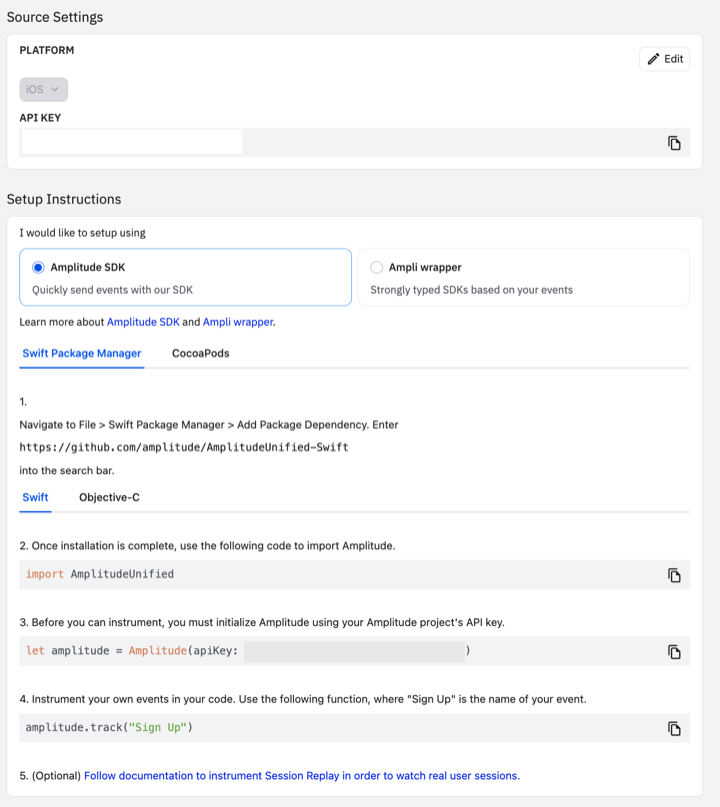
대시보드에서 API Key 확인
Braze 대시보드 Manage Settings → iOS 앱 등록 후 API Key와 SDK Endpoint를 확인합니다.
SPM
- Xcode → Package Manager → braze-swift-sdk
- 패키지에 BrazeKit, BrazeUI 추가
CocoaPods
pod 'BrazeKit'
pod 'BrazeUI'
# Rich Push 사용 시
pod 'BrazeNotificationService'
pod install 후 워크스페이스로 빌드합니다.
AppDelegate — 초기화
import BrazeKit
import BrazeUI

let configuration = Braze.Configuration(
  apiKey: "API Key",
  endpoint: "SDK Endpoint Key"
)
configuration.logger.level = .info
let braze = Braze(configuration: configuration)
AppDelegate.braze = braze

static var braze: Braze? = nil
@import BrazeKit;
BRZConfiguration *configuration =
[[BRZConfiguration alloc] initWithApiKey:@"API Key" endpoint:@"SDK Endpoint Key"];
configuration.logger.level = BRZLoggerLevelInfo;
Braze *braze = [[Braze alloc] initWithConfiguration:configuration];
AppDelegate.braze = braze;API Key·Endpoint는 대시보드 Manage Settings → Android/iOS 앱에서 확인합니다.
External ID
SDK 초기화 이후 코드 예시는 Swift / Objective-C 탭으로 전환할 수 있습니다.
Braze에 연동하면 SDK 초기화 시 anonymous device ID가 생성됩니다. 로그인 시점에는 고객사 고유 식별자를 External ID로 설정합니다.
중요: 로그인 식별자는 고객사 보안 정책에 맞게 설정하며, 국내 보안 정책상 일방향 암호화 적재를 권장합니다.
AppDelegate.braze?.changeUser(userId: "고객사 고유 식별자")[AppDelegate.braze changeUser:@"고객사 고유 식별자"];Event
AppDelegate.braze?.logCustomEvent(name: "기획서에 정의된 이벤트명")

AppDelegate.braze?.logCustomEvent(
  name: "기획서에 정의된 이벤트명",
  properties: [
    "속성명": "값",
    "속성명": false,
    "속성명": 42,
    "속성명": Date(),
    "속성명": ["any", "array", "here"],
    "속성명": ["deeply": ["nested", "json"]]
  ]
)
[AppDelegate.braze logCustomEvent:@"기획서에 정의된 이벤트명"];
[AppDelegate.braze logCustomEvent:@"기획서에 정의된 이벤트명"
properties:@{
@"속성명": @"값",
@"속성명": @NO,
@"속성명": @42,
@"속성명": [NSDate date],
@"속성명": @[@"any", @"array", @"here"],
@"속성명": @{ @"deeply": @[@"nested", @"json"] }
}];즉시 전송
Braze SDK는 배치성으로 전송되기 때문에 민감성 데이터는 requestImmediateDataFlush()를 호출해 실시간으로 전송되도록 구성합니다.
AppDelegate.braze?.requestImmediateDataFlush()[AppDelegate.braze requestImmediateDataFlush];Standard Attribute
Braze가 정의한 사용자 속성입니다. 이름, 성별, 전화번호, 생년월일 등을 설정합니다.
이름 설정
AppDelegate.braze?.user.set(firstName: "이름")[AppDelegate.braze.user setFirstName:@"이름"];성별 설정
AppDelegate.braze?.user.set(gender: .female)[AppDelegate.braze.user setGender:BRZUserGenderFemale];전화번호 설정
AppDelegate.braze?.user.set(phoneNumber: "+821012345678")[AppDelegate.braze.user setPhoneNumber:@"+821012345678"];전화번호는 국가번호 형식(예: +821012345678)으로 업로드해야 합니다. 010 등 로컬 형식은 사용하지 마세요.
생년월일 설정
AppDelegate.braze?.user.set(dateOfBirth: DateComponents(year: 2000, month: 12, day: 25))NSDateComponents *dob = [[NSDateComponents alloc] init];
dob.year = 2000;
dob.month = 12;
dob.day = 25;
[AppDelegate.braze.user setDateOfBirth:dob];즉시 전송
Braze SDK는 배치성으로 전송되기 때문에 민감성 데이터는 requestImmediateDataFlush()를 호출해 실시간으로 전송되도록 구성합니다.
AppDelegate.braze?.requestImmediateDataFlush()[AppDelegate.braze requestImmediateDataFlush];Custom Attribute
고객사가 정의하는 사용자 속성입니다. String, Number, Boolean, Date(ISO-8601), Array 등 타입별 API가 다릅니다.
String
AppDelegate.braze?.user.setCustomAttribute(key: "키", value: "값")[AppDelegate.braze.user setCustomAttributeWithKey:@"키" stringValue:@"값"];Number
AppDelegate.braze?.user.setCustomAttribute(key: "키", value: 42)[AppDelegate.braze.user setCustomAttributeWithKey:@"키" andIntegerValue:42];Boolean
AppDelegate.braze?.user.setCustomAttribute(key: "키", value: true)[AppDelegate.braze.user setCustomAttributeWithKey:@"키" andBOOLValue:YES];Date (ISO-8601)
Date 형태 속성에 년·월·일만 전달하면 문자열로 인식될 수 있습니다. Braze에는 ISO-8601 형식(예: 2013-07-16T19:20:30+09:00)으로 업데이트하세요.
AppDelegate.braze?.user.setCustomAttribute(key: "키", value: "2013-07-16T19:20:30+09:00")[AppDelegate.braze.user setCustomAttributeWithKey:@"키" stringValue:@"2013-07-16T19:20:30+09:00"];Array
고객 이력 정보(예: 검색·구매 이력)를 활용한 개인화 코드 목적으로 사용됩니다. 이러한 이력 정보가 DB에 없는 값이라면 Add/Remove 함수만 사용하여 이력 정보를 최신화하도록 구성합니다.
AppDelegate.braze?.user.setCustomAttribute(key: "키", value: ["값1", "값2"])
AppDelegate.braze?.user.addToCustomAttributeArray(key: "키", value: "추가")
AppDelegate.braze?.user.removeFromCustomAttributeArray(key: "키", value: "제거")
[AppDelegate.braze.user setCustomAttributeArrayWithKey:@"키" array:@[@"값1", @"값2"]];
[AppDelegate.braze.user addToCustomAttributeArrayWithKey:@"키" value:@"추가"];
[AppDelegate.braze.user removeFromCustomAttributeArrayWithKey:@"키" value:@"제거"];속성 삭제
AppDelegate.braze?.user.unsetCustomAttribute(key: "키")[AppDelegate.braze.user unsetCustomAttributeWithKey:@"키"];즉시 전송
Braze SDK는 배치성으로 전송되기 때문에 민감성 데이터는 requestImmediateDataFlush()를 호출해 실시간으로 전송되도록 구성합니다.
AppDelegate.braze?.requestImmediateDataFlush()[AppDelegate.braze requestImmediateDataFlush];Purchase
Purchase event (Legacy)
Braze 공식 문서 기준으로 레거시 Purchase event는 maintenance mode로 전환되었고, 신규 기능은 eCommerce Recommended Event 기반으로 제공됩니다. 신규 고객사는 eCommerce Recommended Event 사용을 권장합니다.
logPurchase로 구매 이벤트를 전송합니다. 상품 ID, 통화, 가격, 수량 및 Purchase Property를 지정할 수 있습니다.
기본 구매
AppDelegate.braze?.logPurchase(
  productID: "product_id",
  currency: "USD",
  price: price,
  quantity: quantity
)
[AppDelegate.braze logPurchase:@"product_id"
currency:@"USD"
price:price
quantity:quantity];구매 속성 포함
var purchaseProperties: [String: Any] = [:]
purchaseProperties["기획서 속성명"] = "값"
AppDelegate.braze?.logPurchase(
  productID: "product_id",
  currency: "USD",
  price: price,
  quantity: quantity,
  properties: purchaseProperties
)
NSMutableDictionary *purchaseProperties = [NSMutableDictionary dictionary];
purchaseProperties[@"기획서 속성명"] = @"값";
[AppDelegate.braze logPurchase:@"product_id"
currency:@"USD"
price:price
quantity:quantity
properties:purchaseProperties];eCommerce Recommended Event
Braze의 eCommerce Recommended Event는 정해진 이벤트명과 스키마(속성 구조)를 가진 커스텀 이벤트입니다. 이벤트가 스키마 검증을 통과하면 Braze가 매출 계산, 장바구니 상태 관리 등 후처리를 자동으로 수행합니다.
이벤트명·속성명은 텍소노미 기획 문서와 동일하게 유지하세요. 아래 예시의 Braze 권장 이벤트명·스키마 필드는 참고용이며, metadata 등 커스텀 속성 키/값은 기획 문서 명세를 따릅니다.
Swift SDK 15.0.0+
핵심 개념
이벤트명은 정확히(case-sensitive) 아래 canonical name을 사용해야 합니다. 이름이 다르면 일반 Custom Event로 처리되어 eCommerce 후처리가 동작하지 않습니다. 속성명도 텍소노미 기획 문서에 정의된 키를 그대로 사용하세요.
ecommerce.product_viewedecommerce.cart_updatedecommerce.checkout_startedecommerce.order_placedecommerce.order_cancelledecommerce.order_refunded
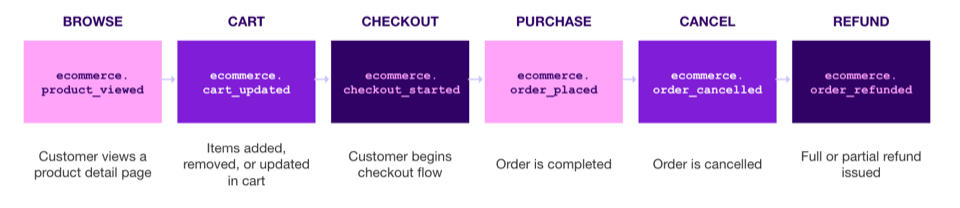
위 다이어그램은 Braze eCommerce recommended events에서 정의한 구매 여정 6단계(조회 → 장바구니 → 체크아웃 → 주문완료 → 취소 → 환불)를 요약한 이미지입니다.
권장 이벤트는 스키마가 엄격하므로, properties 최상위에 커스텀 필드를 추가하면 검증 실패로 이벤트가 드롭될 수 있습니다. 커스텀 필드는 metadata(event-level) 또는 products[].metadata에 넣어야 합니다.
주문 완료(결제 완료) — ecommerce.order_placed (권장)
주문/결제 성공 시점에 ecommerce.order_placed를 전송합니다.
이 이벤트는 Braze에서 주요 매출 드라이버로 처리되며, 검증이 통과하면 사용자 프로필의 Total Revenue(total_value 기준) 및 Total Orders가 자동 업데이트됩니다.
예시 (logEcommerceEvent)
if let productLine = try? Braze.Ecommerce.ProductLineItem(
    productId: "632910392",
    productName: "Wireless Headphones",
    variantId: "808950810",
    quantity: 1,
    price: 199.98,
    metadata: [
        "sku": "WH-BLK-PRO",
        "color": "Black",
        "brand": "BrazeAudio"
    ]
), let orderPlacedEvent = try? Braze.Ecommerce.OrderPlacedEvent(
    orderId: "order_67890",
    cartId: "cart_12345",
    totalValue: 189.98,
    currency: "USD",
    totalDiscounts: 10.00,
    discounts: [.structured(code: "SAVE10", amount: 10.00, type: "fixed")],
    products: [productLine],
    source: "ios",
    metadata: [
        "order_status_url": "https://braze-audio.com/orders/67890/status",
        "order_number": "ORD-2024-001234"
    ]
) {
    AppDelegate.braze?.logEcommerceEvent(orderPlacedEvent)
}
NSDictionary *product = @{
@"product_id": @"632910392",
@"product_name": @"Wireless Headphones",
@"variant_id": @"808950810",
@"quantity": @1,
@"price": @199.98,
@"metadata": @{
@"sku": @"WH-BLK-PRO",
@"color": @"Black",
@"brand": @"BrazeAudio"
}
};
NSDictionary *properties = @{
@"order_id": @"order_67890",
@"cart_id": @"cart_12345",
@"total_value": @189.98,
@"currency": @"USD",
@"total_discounts": @10.00,
@"discounts": @[@{ @"code": @"SAVE10", @"amount": @10.00, @"type": @"fixed" }],
@"products": @[product],
@"source": @"ios",
@"metadata": @{
@"order_status_url": @"https://braze-audio.com/orders/67890/status",
@"order_number": @"ORD-2024-001234"
}
};
[AppDelegate.braze logCustomEvent:@"ecommerce.order_placed" properties:properties];별첨 — ecommerce.order_placed metadata 필드 정의
커스텀 필드는 properties 최상위가 아닌 metadata 또는 products[].metadata에 넣어야 합니다.
이벤트 레벨 metadata
| 필드 | 타입 | 필수 | 설명 |
|---|---|---|---|
order_status_url |
String | 선택 | Braze 인식 권장 — 주문 상태 확인 URL |
| 기타 커스텀 키 | String · Number · Boolean 등 | 선택 | 이벤트 레벨 부가 정보 (예: gift_wrapped) |
상품 레벨 products[].metadata
| 필드 | 타입 | 필수 | 설명 |
|---|---|---|---|
sku |
String | 선택 | Braze 인식 권장 — SKU |
| 기타 커스텀 키 | String · Number · Boolean 등 | 선택 | 상품 옵션 등 (예: color, size) |
장바구니 업데이트 — ecommerce.cart_updated
장바구니 변경 시점마다 전송합니다. action을 사용해 증분(add/remove) 방식 또는 전체 교체(replace 또는 action 생략) 방식 중 하나를 선택합니다.
동일 cart_id에 대해 증분 방식과 전체 교체 방식을 섞어 쓰는 것은 권장되지 않습니다.
예시 (logEcommerceEvent)
if let productLine = try? Braze.Ecommerce.ProductLineItem(
    productId: "8266836345064",
    productName: "Classic T-Shirt",
    variantId: "44610569208040",
    quantity: 2,
    price: 99.99,
    metadata: [
        "sku": "TSH-BLU-M",
        "color": "BLUE",
        "size": "Medium"
    ]
), let cartUpdatedEvent = try? Braze.Ecommerce.CartUpdatedEvent(
    cartId: "cart_12345",
    totalValue: 199.98,
    currency: "USD",
    products: [productLine],
    source: "ios",
    metadata: [:]
) {
    AppDelegate.braze?.logEcommerceEvent(cartUpdatedEvent)
}
NSDictionary *product = @{
@"product_id": @"8266836345064",
@"product_name": @"Classic T-Shirt",
@"variant_id": @"44610569208040",
@"quantity": @2,
@"price": @99.99,
@"metadata": @{ @"sku": @"TSH-BLU-M", @"color": @"BLUE", @"size": @"Medium" }
};
NSDictionary *properties = @{
@"cart_id": @"cart_12345",
@"total_value": @199.98,
@"currency": @"USD",
@"products": @[product],
@"source": @"ios",
@"metadata": @{}
};
[AppDelegate.braze logCustomEvent:@"ecommerce.cart_updated" properties:properties];체크아웃 시작 — ecommerce.checkout_started
체크아웃 진입 시점(체크아웃 버튼 클릭 또는 체크아웃 페이지 진입 등)에 전송합니다.
예시 (logEcommerceEvent)
if let productLine = try? Braze.Ecommerce.ProductLineItem(
    productId: "632910392",
    productName: "Wireless Headphones",
    variantId: "808950810",
    quantity: 1,
    price: 199.98,
    metadata: [
        "sku": "WH-BLK-PRO",
        "color": "Black",
        "brand": "BrazeAudio"
    ]
), let checkoutStartedEvent = try? Braze.Ecommerce.CheckoutStartedEvent(
    checkoutId: "checkout_abc123",
    cartId: "cart_12345",
    totalValue: 199.98,
    currency: "USD",
    products: [productLine],
    source: "ios",
    metadata: [
        "checkout_url": "https://checkout.braze-audio.com/abc123"
    ]
) {
    AppDelegate.braze?.logEcommerceEvent(checkoutStartedEvent)
}
NSDictionary *product = @{
@"product_id": @"632910392",
@"product_name": @"Wireless Headphones",
@"variant_id": @"808950810",
@"quantity": @1,
@"price": @199.98,
@"metadata": @{ @"sku": @"WH-BLK-PRO", @"color": @"Black", @"brand": @"BrazeAudio" }
};
NSDictionary *properties = @{
@"checkout_id": @"checkout_abc123",
@"cart_id": @"cart_12345",
@"total_value": @199.98,
@"currency": @"USD",
@"products": @[product],
@"source": @"ios",
@"metadata": @{ @"checkout_url": @"https://checkout.braze-audio.com/abc123" }
};
[AppDelegate.braze logCustomEvent:@"ecommerce.checkout_started" properties:properties];주문 취소/환불 — ecommerce.order_cancelled, ecommerce.order_refunded
ecommerce.order_cancelled: Total Orders를 감소시키며, 매출(total revenue)에는 영향을 주지 않습니다.ecommerce.order_refunded: refund 금액만큼 Total Revenue를 감소시키고 Total Refund Value를 증가시킵니다. 부분 환불은total_value에 환불 금액만 전달합니다.
예시 — order_cancelled (logCustomEvent)
let products: [[String: Any]] = [
    [
        "product_id": "632910392",
        "product_name": "Wireless Headphones",
        "variant_id": "808950810",
        "quantity": 1,
        "price": 199.98,
        "metadata": [
            "sku": "WH-BLK-PRO",
            "color": "Black",
            "brand": "BrazeAudio"
        ]
    ]
]

let properties: [String: Any] = [
    "order_id": "order_67890",
    "cancel_reason": "customer changed mind",
    "total_value": 189.98,
    "currency": "USD",
    "products": products,
    "source": "ios",
    "metadata": [
        "order_status_url": "https://braze-audio.com/orders/67890/status"
    ]
]

AppDelegate.braze?.logCustomEvent(name: "ecommerce.order_cancelled", properties: properties)
NSArray *products = @[@{
@"product_id": @"632910392",
@"product_name": @"Wireless Headphones",
@"variant_id": @"808950810",
@"quantity": @1,
@"price": @199.98,
@"metadata": @{ @"sku": @"WH-BLK-PRO", @"color": @"Black", @"brand": @"BrazeAudio" }
}];
NSDictionary *properties = @{
@"order_id": @"order_67890",
@"cancel_reason": @"customer changed mind",
@"total_value": @189.98,
@"currency": @"USD",
@"products": products,
@"source": @"ios",
@"metadata": @{ @"order_status_url": @"https://braze-audio.com/orders/67890/status" }
};
[AppDelegate.braze logCustomEvent:@"ecommerce.order_cancelled" properties:properties];예시 — order_refunded (logCustomEvent)
let properties: [String: Any] = [
    "order_id": "order_67890",
    "total_value": 99.99,
    "currency": "USD",
    "products": products,
    "source": "ios",
    "metadata": [
        "order_status_url": "https://braze-audio.com/orders/67890/status",
        "order_note": "Customer requested refund due to defective item"
    ]
]

AppDelegate.braze?.logCustomEvent(name: "ecommerce.order_refunded", properties: properties)
NSDictionary *properties = @{
@"order_id": @"order_67890",
@"total_value": @99.99,
@"currency": @"USD",
@"products": products,
@"source": @"ios",
@"metadata": @{
@"order_status_url": @"https://braze-audio.com/orders/67890/status",
@"order_note": @"Customer requested refund due to defective item"
}
};
[AppDelegate.braze logCustomEvent:@"ecommerce.order_refunded" properties:properties];구현/운영 시 참고
ecommerce.order_cancelled·ecommerce.order_refunded는 typed SDK class/API가 없어logCustomEvent()로 스키마에 맞게 전송합니다.- 통화(
currency)는 ISO 4217 3자리 코드를 사용하며, Non-USD 통화는 자동으로 USD로 환산되어 매출 지표에 반영됩니다. - 이벤트 검증 실패 시, 권장 이벤트는 사용자 프로필에 적재되지 않고 드롭될 수 있습니다. (REST API는 응답의
errors배열로 확인 가능) - 레거시 Purchase event와 권장 이벤트를 같은 주문에 대해 동시에 내면 매출이 중복 집계될 수 있으니 전환 시 유의하세요.
Push
iOS는 APNS입니다. Xcode Sign & Capabilities에서 Push Notifications를 활성화하고 Braze 대시보드에 인증서/키를 등록합니다.
import UserNotifications

application.registerForRemoteNotifications()
let center = UNUserNotificationCenter.current()
center.setNotificationCategories(Braze.Notifications.categories)
center.delegate = self
center.requestAuthorization(options: [.badge, .sound, .alert]) { granted, error in
  print("granted: \(granted)")
}

func application(_ application: UIApplication,
  didRegisterForRemoteNotificationsWithDeviceToken deviceToken: Data) {
  AppDelegate.braze?.notifications.register(deviceToken: deviceToken)
}

func application(_ application: UIApplication,
  didReceiveRemoteNotification userInfo: [AnyHashable: Any],
  fetchCompletionHandler completionHandler: @escaping (UIBackgroundFetchResult) -> Void) {
  if let braze = AppDelegate.braze,
     braze.notifications.handleBackgroundNotification(
       userInfo: userInfo,
       fetchCompletionHandler: completionHandler
     ) { return }
  completionHandler(.noData)
}
UNUserNotificationCenterDelegate
extension AppDelegate: UNUserNotificationCenterDelegate {
  func userNotificationCenter(_ center: UNUserNotificationCenter,
    didReceive response: UNNotificationResponse,
    withCompletionHandler completionHandler: @escaping () -> Void) {
    if let braze = AppDelegate.braze,
       braze.notifications.handleUserNotification(
         response: response,
         withCompletionHandler: completionHandler
       ) { return }
    completionHandler()
  }
}
In-App Message
let inAppMessageUI = BrazeInAppMessageUI()
AppDelegate.braze?.inAppMessagePresenter = inAppMessageUI
Modal, Slide, Full, Custom HTML, Simple Survey 등 5가지 유형을 지원합니다.
하이브리드
WebView User-Agent에 /BrazeiOS 등을 설정하고, 네이티브 메시지 핸들러로 Custom Event·Attribute를 수신합니다.
아래 코드는 고객사 이해를 돕기 위한 예시입니다. 자체적으로 사용 중인 인터페이스 코드를 활용해 운영하셔도 됩니다.
WebView — Custom Event / Attribute (예시)
// Android 가이드와 동일한 브릿지 패턴 — User-Agent 분기 후 네이티브로 전달
// iOS: webkit.messageHandlers.NativeCallback.postMessage(...)
WKWebView 설정 (예시)
let contentController = WKUserContentController()
let config = WKWebViewConfiguration()
contentController.add(self, name: "NativeCallback")
config.applicationNameForUserAgent = "/BrazeiOS"
config.userContentController = contentController
WKUserContentController *contentController = [[WKUserContentController alloc] init];
WKWebViewConfiguration *config = [[WKWebViewConfiguration alloc] init];
[contentController addScriptMessageHandler:self name:@"NativeCallback"];
config.applicationNameForUserAgent = @"/BrazeiOS";
config.userContentController = contentController;Native — message handler (예시)
func userContentController(_ userContentController: WKUserContentController,
  didReceive message: WKScriptMessage) {
  guard message.name == "NativeCallback",
        var commonData = message.body as? [String: Any] else { return }
  let eventName = commonData["EventName"] as? String
  if eventName != "customAttribute" {
    commonData.removeValue(forKey: "EventName")
    AppDelegate.braze?.logCustomEvent(name: eventName!, properties: commonData)
    AppDelegate.braze?.requestImmediateDataFlush()
  } else {
    commonData.removeValue(forKey: "EventName")
    for (key, value) in commonData {
      // 타입별 setCustomAttribute
    }
    AppDelegate.braze?.requestImmediateDataFlush()
  }
}
- (void)userContentController:(WKUserContentController *)userContentController
didReceiveScriptMessage:(WKScriptMessage *)message {
if (![message.name isEqualToString:@"NativeCallback"]) { return; }
NSDictionary *commonData = message.body;
if (![commonData isKindOfClass:[NSDictionary class]]) { return; }
NSString *eventName = commonData[@"EventName"];
NSMutableDictionary *payload = [commonData mutableCopy];
[payload removeObjectForKey:@"EventName"];
if (![eventName isEqualToString:@"customAttribute"]) {
[AppDelegate.braze logCustomEvent:eventName properties:payload];
[AppDelegate.braze requestImmediateDataFlush];
} else {
// 타입별 setCustomAttributeWithKey
[AppDelegate.braze requestImmediateDataFlush];
}
}태깅 예시
로그인 완료
if (로그인) {
  AppDelegate.braze?.changeUser(userId: "고객사 고유 식별자")
}
AppDelegate.braze?.logCustomEvent(
  name: "로그인 완료",
  properties: [
    "event_name": "로그인 완료",
    "event_time": "2024-07-04T13:00:00",
    "loginyn": true,
    "platform": "iOS"
  ]
)
AppDelegate.braze?.requestImmediateDataFlush()
if (로그인) {
[AppDelegate.braze changeUser:@"고객사 고유 식별자"];
}
[AppDelegate.braze logCustomEvent:@"로그인 완료"
properties:@{
@"event_name": @"로그인 완료",
@"event_time": @"2024-07-04T13:00:00",
@"loginyn": @YES,
@"platform": @"iOS"
}];
[AppDelegate.braze requestImmediateDataFlush];검색
AppDelegate.braze?.user.addToCustomAttributeArray(
  key: "searchkeyword",
  value: "id_1710805494/biztype_REV/항공권_국제 ~"
)
AppDelegate.braze?.logCustomEvent(name: "검색", properties: [ /* 텍소노미 */ ])
AppDelegate.braze?.requestImmediateDataFlush()
[AppDelegate.braze.user addToCustomAttributeArrayWithKey:@"searchkeyword"
value:@"id_1710805494/biztype_REV/항공권_국제 ~"];
[AppDelegate.braze logCustomEvent:@"검색" properties:@{ /* 텍소노미 */ }];
[AppDelegate.braze requestImmediateDataFlush];Push 추가 설정
Rich Push·이미지 푸시는 Notification Service Extension과 BrazeNotificationService가 필요합니다.
import BrazeNotificationService
import UserNotifications

class NotificationService: UNNotificationServiceExtension {
  override func didReceive(
    _ request: UNNotificationRequest,
    withContentHandler contentHandler: @escaping (UNNotificationContent) -> Void
  ) {
    if brazeHandle(request: request, contentHandler: contentHandler) {
      return
    }
    contentHandler(request.content)
  }
}
SPM/CocoaPods에 BrazeNotificationService를 추가하고 Xcode Target에 Notification Service Extension을 구성하세요.
In-App 핸들러
인앱 표시 여부·버튼 클릭 등을 BrazeInAppMessageUIDelegate로 커스텀할 수 있습니다.
let inAppMessageUI = BrazeInAppMessageUI()
inAppMessageUI.delegate = self
AppDelegate.braze?.inAppMessagePresenter = inAppMessageUI

extension AppDelegate: BrazeInAppMessageUIDelegate {
  func inAppMessage(
    _ ui: BrazeInAppMessageUI,
    displayChoiceForMessage message: Braze.InAppMessage
  ) -> BrazeInAppMessageUI.DisplayChoice {
    return .now
  }

  func inAppMessage(
    _ ui: BrazeInAppMessageUI,
    willPresent message: Braze.InAppMessage,
    view: InAppMessageView
  ) {
    // 표시 직전 처리
  }

  func inAppMessage(
    _ ui: BrazeInAppMessageUI,
    didDismiss message: Braze.InAppMessage,
    view: InAppMessageView
  ) {
    // 닫힘 처리
  }
}
트리거 최소 간격
let configuration = Braze.Configuration(
  apiKey: "API Key",
  endpoint: "SDK Endpoint Key"
)
configuration.triggerMinimumTimeInterval = 30
let braze = Braze(configuration: configuration)
AppDelegate.braze = braze
SDK 로직상 피로도 방지를 위해, 기본적으로 인앱 노출 이후 30초 동안 다른 인앱 메시지 이벤트가 트리거되어도 노출되지 않습니다. 필요 시 triggerMinimumTimeInterval로 최소 간격을 조정할 수 있습니다.
SDK 세션 시간
let configuration = Braze.Configuration(apiKey: "API Key", endpoint: "SDK Endpoint")
configuration.sessionTimeout = 60
let braze = Braze(configuration: configuration)
AppDelegate.braze = braze
연동 체크리스트
- 대시보드 iOS 앱 · API Key · Endpoint
- SPM/CocoaPods · AppDelegate 초기화 · BrazeUI
- APNS · Push Capability · deviceToken 등록
- 로그인 시 changeUser · 하이브리드 WKWebView 브릿지
- Rich Push 시 Notification Service Extension